
Setting up 8K on PC
Our 8K builds work on a Windows PC over a USB cable. Here's how to set one up and check it's running at 8K.
Before you start
- A Windows PC. The SuiOvOi 8K also works on a PS4 console; the HeliumStrike 8K and MH4-ANALOG 8K don't work on a PS4 or PS5.
- There's no wireless or battery. With the SuiOvOi 8K, HeliumStrike 8K and MH4-ANALOG 8K, there's also no rumble, sound or motion controls, and the touchpad works as a button only: it clicks, but swipes don't work. The HeliumStrike 2 8K keeps rumble, the touchpad and motion controls, but has no sound either.
- A USB-C data cable. Every 8K build comes with a free 1.5 m one.
- Plug the controller straight into a USB port on the PC, not into a hub or a front-panel extension.
1. Plug it in
Connect the controller to your PC. Windows should recognise it within a few seconds.
2. Set up your 8K board
The steps depend on which 8K board you chose. It's listed in your order confirmation email.
SuiOvOi 8K
Setup steps coming soon.
HeliumStrike 8K (formerly HyperStrike)
Setup steps coming soon.
MH4-ANALOG 8K
Setup steps coming soon.
HeliumStrike 2 8K (coming soon)
Setup steps coming soon.
Image coming soon
3. Check the polling rate
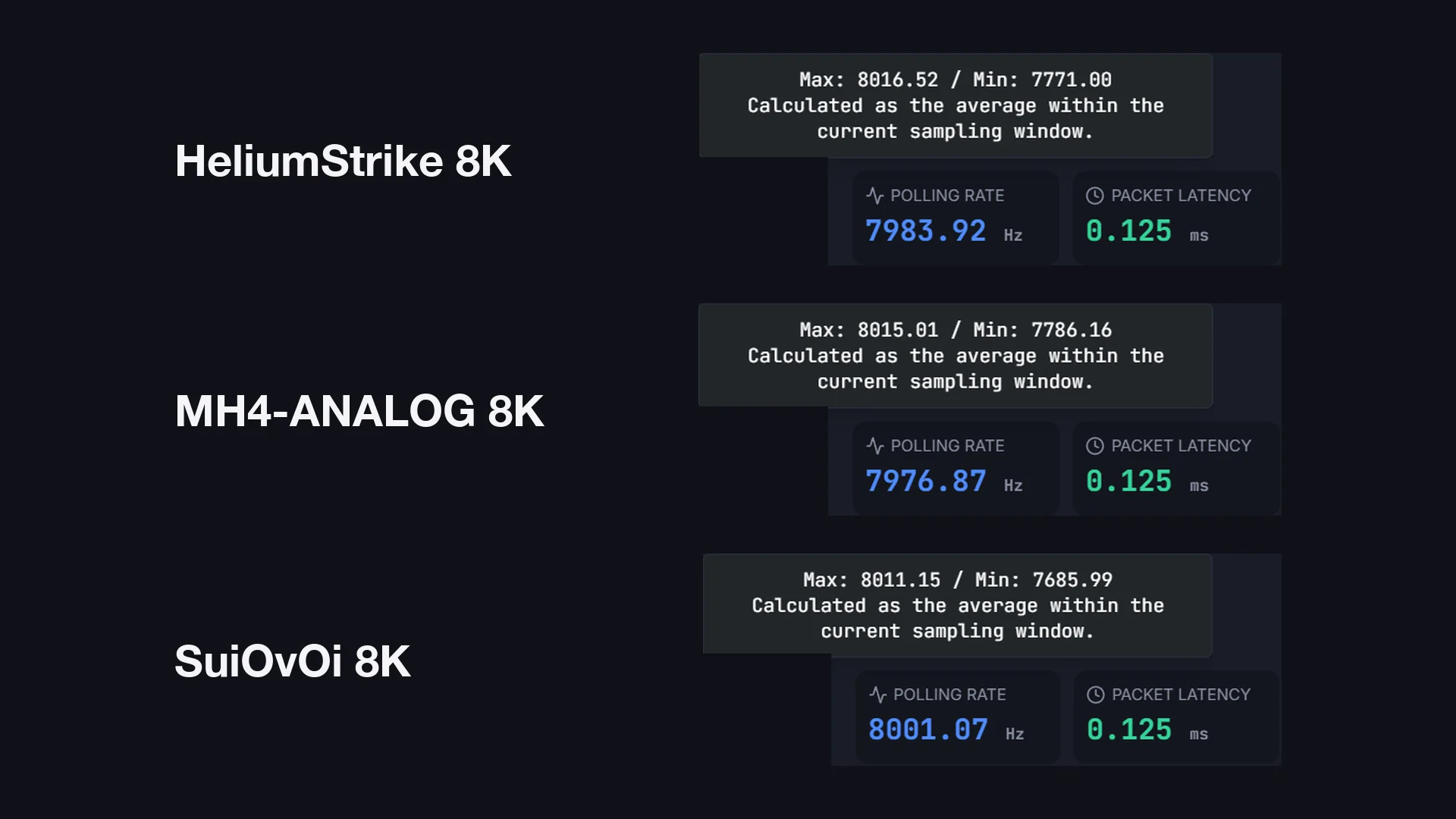
Open a polling rate tester. We use ControllerMeta, a paid Windows app on Steam. Move a thumbstick in circles: the average should be close to 8,000 Hz.
The reading moves around a little. In our studio, our 8K boards read between 7,685 and 8,016 Hz, averaging 8,000 Hz. Your PC, USB port and cable can affect it too, not just the board.
If it isn't working
- Try a different USB port, ideally one on the back of the PC.
- Try a different cable, and make sure it's a data cable, not a charge-only one.
- Close other controller software that might be taking over the controller.
- Still stuck? Send us a message with your order number and what you've tried.